
Construction Management Software in Canada: What Canadian Contractors Should Look For
Most construction management software is built in the United States first, then sold in Canada. That works for scheduling and photos, but Canadian contractors run into the gaps quickly: prices in US dollars, sales taxes that vary by province, holdbacks, French-speaking clients and year-end T5018 reporting. This guide covers what to look for in construction management software in Canada and how Billdr handles it.
We build Billdr, construction management software made in Montreal. The checklist in this guide applies to any vendor. It isn’t legal or tax advice; confirm provincial rules with your accountant or lawyer.
Why Canadian Contractors Need Software Built for Canada
| Canadian requirement | What it means for your software |
|---|---|
| Canadian dollars | Pricing and billing in CAD, without exchange-rate surprises |
| Provincial sales taxes | GST, HST, PST or QST applied correctly on quotes, change orders and invoices |
| Holdbacks | Holdbacks shown on progress invoices and tracked until they’re released |
| Prompt payment rules | Clear invoice dates and payment tracking, since Ontario, Alberta and other provinces have prompt payment legislation |
| English and French | Quotes, invoices and client portals in both languages, essential in Quebec |
| T5018 reporting | Subcontractor payments tracked for year-end reporting to the CRA |
| Canadian winters | Schedules that are easy to shift around weather and seasonal work |
What makes construction software a good fit for Canadian contractors.
How to Choose Construction Management Software in Canada
Use these questions when comparing construction software in Canada, whether you need estimating, project management, scheduling or accounting tools:
| Question to ask | Why it matters |
|---|---|
| Is it priced in Canadian dollars? | US-dollar pricing changes every month with the exchange rate. |
| Does it handle my province’s sales taxes? | Mixing up GST, HST, PST and QST creates errors on every invoice. |
| Can it show holdbacks on progress invoices? | Holdbacks are standard on Canadian jobs, commonly 10%. |
| Is it available in French? | Essential if you work in Quebec or with French-speaking clients. |
| Where is my data stored? | Some contractors and clients prefer data hosted in Canada; ask the vendor. |
| Does it sync with QuickBooks Online? | Most small and mid-sized Canadian contractors keep their books there. |
| When is support available? | Support during Canadian business hours, in your language, saves days. |
| Is it built for residential and renovation work? | Many platforms are designed for large commercial projects. |
Eight questions to ask any construction software vendor in Canada.
Canadian Construction Software by Job
Construction estimating software in Canada. Look for estimates priced from your own cost catalog in CAD, with provincial taxes applied, that become a quote your client signs online. Our guide to AI construction estimating software covers how AI estimators work.
Construction project management software in Canada. Daily logs, tasks, punch lists and a client portal, in English and French.
Construction scheduling software in Canada. Schedules with dependencies that are easy to adjust around winter conditions and seasonal work.
Construction accounting software in Canada. Most contractors keep accounting in QuickBooks Online and sync it with construction software. See our guide to QuickBooks for contractors.
Home builder software in Canada. Selections, allowances, deposits and progress billing with holdbacks, plus a homebuyer portal. See Billdr for custom home builders.
Billdr: Canadian-Made Construction Management Software
Billdr was founded and is headquartered in Montreal. It serves general contractors and home builders across North America, and most of its customers are Canadian contractors in Quebec, Ontario and British Columbia. It was built with Canadian requirements in mind:
Priced in your currency. Canadian customers are billed in CAD and US customers in USD. Plans start at $200 a month, billed annually in Canadian dollars for Canadian customers (see pricing).
English and French. Your team and your clients can work in either language.
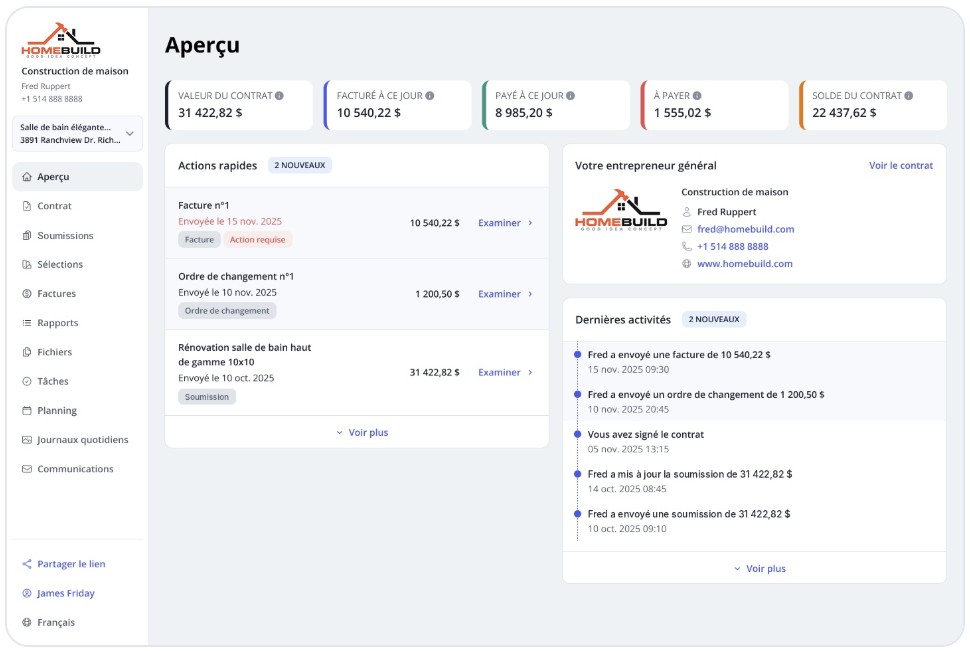
The Billdr client dashboard in French: quotes, invoices, change orders and project activity in one place.
Billdr is available in French and English. The screen above shows the French client view.
Taxes, holdbacks and progress billing. Quotes and invoices include taxes, and invoices support deposits, progress and milestone billing, and retainage for holdbacks.
QuickBooks Online sync. Invoices, payments, expenses, bills, purchase orders and customers sync to QuickBooks Online.

In Billdr, you connect to QuickBooks Online from the settings and choose which records to sync, such as customers, invoices and payments.
AI built in. Bruno, the AI estimator, drafts estimates from your plans and your own prices, and Bob, the AI copilot, flags issues on every active job. Read more in our guide to AI-native construction software.
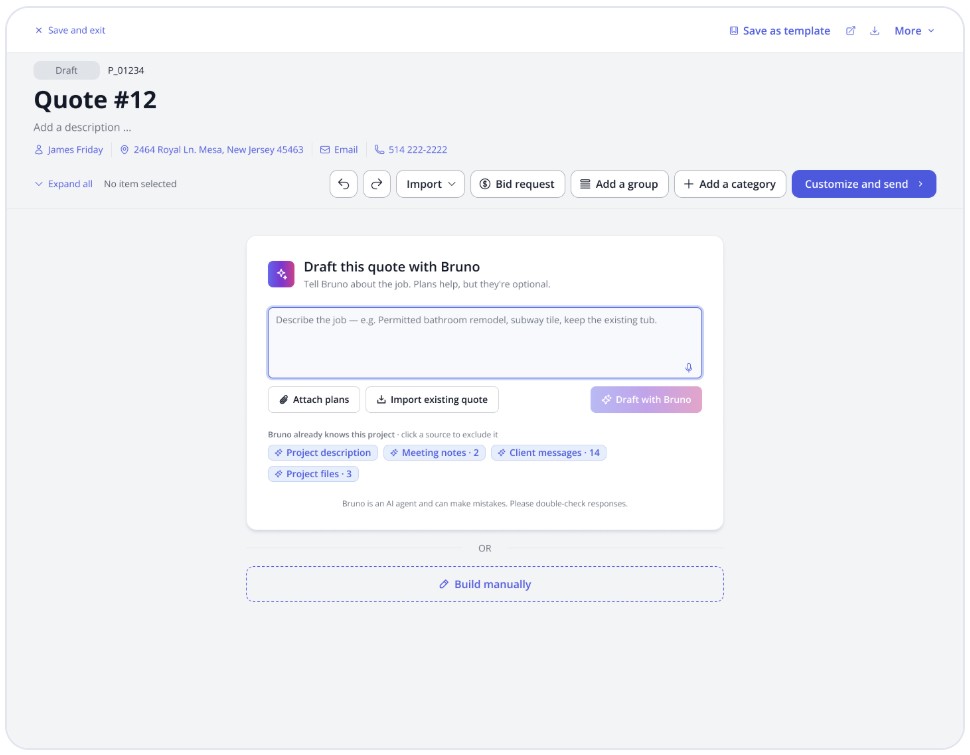
Bruno drafts a first quote from a project description and attached plans. Plans are optional.
Canadian contractors using Billdr
| Region | Contractor | Result with Billdr |
|---|---|---|
| Greater Vancouver, BC | Terrafirma Industries (Maple Ridge) | Kitchen quotes cut from up to 2 hours to 30 minutes |
| Greater Toronto Area, ON | Aozat | Doubled its project capacity by centralizing client communication, quotes, invoices and site reports |
| Montreal, QC | Construction Tomico | Bills cost-plus clients twice as fast, with one less person on billing |
| Joliette, QC | Le Projet Local | Saves 2+ hours a day on crew follow-ups |
Results from Billdr customer case studies across Canada.
“It’s clean, it’s modern, it’s intuitive, it’s simple, but functional.” Dave Conroy, owner, The Little Building Company (Peterborough, Ontario)
Canadian-made, built for contractors across North America
See how Billdr handles CAD pricing, French and English, taxes and holdbacks.
👉 Schedule a 1-on-1 Billdr demo4 Mistakes Canadian Contractors Make When Choosing Software
Comparing US-dollar prices without converting them, then paying more every month.
Assuming taxes are handled, then fixing GST, HST or QST on every invoice by hand.
Tracking holdbacks in a spreadsheet next to the software.
Choosing English-only software when part of your team or your clients work in French.
Q1: Which construction management software is made in Canada?
Several construction platforms are built in Canada. Billdr is one of them: Canadian-made construction management software, founded and headquartered in Montreal, for general contractors and home builders across North America. It covers estimates, change orders, schedules, budgets and invoicing, with AI built in.
Q2: What should Canadian contractors look for in construction management software?
Pricing in Canadian dollars, English and French, correct GST, HST, PST and QST on quotes and invoices, holdbacks on progress billing, QuickBooks sync, support during Canadian business hours, and clear answers about where your data is stored.
Q3: Does construction software handle GST, HST, PST and QST?
Good construction software applies the right sales taxes for each province on quotes, change orders and invoices. Check that it can handle combined taxes like GST and QST in Quebec, or GST and PST in British Columbia, and HST in harmonized provinces.
Q4: How do holdbacks work in construction software?
Most provinces’ lien laws require owners to hold back part of each payment, commonly 10%, until the holdback period ends. Construction software should let you show the holdback on each progress invoice and track what is still owed when it’s released.
Q5: Is there construction management software in French for Quebec contractors?
Yes. Look for software where both your team and your clients can work in French, including quotes (soumissions), change orders and invoices. Billdr is available in French and English.
Q6: Should Canadian contractors pay for software in Canadian dollars?
It helps. Software billed in US dollars changes in cost with the exchange rate and can come with foreign transaction fees. Billdr bills Canadian customers in CAD and US customers in USD.
Q7: What is the best construction estimating software in Canada?
The best fit prices work from your own cost catalog, applies Canadian taxes and turns the estimate into a quote your client can sign online. Billdr includes Bruno, an AI estimator that drafts estimates from your plans and your own prices.
Q8: Does Canadian construction software work with QuickBooks?
Many platforms sync with QuickBooks Online. Billdr syncs invoices, payments, expenses, bills, purchase orders and customers with QuickBooks Online, so your accountant keeps working in QuickBooks.
Q9: Does Billdr work for contractors in the United States?
Yes. Billdr serves general contractors and home builders across North America, with pricing in USD for US customers and CAD for Canadian customers.