
AI Construction Software: What AI-Native Means and How AI Assistants Run Projects
This guide to AI construction software explains what “AI-native” means, how it differs from AI added on later, what AI assistants actually do on a construction project, which construction AI tools exist for which jobs, and how to tell real AI from marketing.
We build Billdr, AI-native construction management software. The definitions and the checklist in this guide apply to any vendor.
What Is AI-Native Construction Software?
The difference matters because an AI assistant is only as useful as what it can see. A chatbot added on top of an older system often can’t read your cost catalog, your change orders and your daily logs together, so it can answer questions but can’t do much of the work.
AI-Native vs. AI Added On Later
| AI added on later | AI-native | |
|---|---|---|
| Where the AI lives | A separate tool, add-on or chat window | Inside the core product |
| What it can see | Usually one area, like documents or scheduling | The whole job: estimates, budget, schedule, files, client messages |
| What it does | Answers questions or handles one task | Drafts, monitors and flags inside your workflows |
| Setup | Extra subscriptions, integrations or exports | Included and connected from the start |
| Pricing data | Often generic | Your own cost catalog, rates and markups |
How AI-native construction software differs from AI added to an existing product.
What AI Assistants Do on a Construction Project
AI for construction project management isn’t one feature. It’s a set of jobs an assistant can take off your plate:
Monitoring active jobs. Watching every project for problems like unapproved change orders, overdue invoices or budgets drifting off track, and flagging them before they grow.
Drafting estimates. Reading plans and project documents, writing the scope by trade and pricing it from your cost data.
Answering questions about the job. Finding what the specs, contracts or meeting notes say without searching page by page.
Summarizing the field. Turning a week of daily logs and site photos into a short update for the office or the client.
Cutting admin. Taking repetitive data entry and follow-ups off the office team.
Construction AI Tools by Job
Construction AI software and tools fall into a few categories. Most general contractors start with the one that costs them the most time:
| Category | What it does | Best for |
|---|---|---|
| AI estimators | Draft a priced estimate from plans or a job description | Contractors who estimate often |
| AI takeoff | Measure quantities from drawings | Estimators with their own pricing system |
| Project copilots | Monitor jobs, flag risks, answer questions | Owners and project managers running several jobs |
| Document and contract review | Read specs and contracts for risks and requirements | Commercial and bid-heavy work |
| Scheduling AI | Suggest sequences and spot conflicts | Large or complex schedules |
| Site capture and progress | Turn photos or scans into progress tracking | Sites with frequent progress reporting |
| General chat assistants | Write emails, summaries and first drafts | Everyday office writing |
Common types of construction AI tools. AI-native platforms combine several of these in one system.
For estimating in depth, see our guide to AI construction estimating software.
How to Tell If Construction Software Is Really AI-Native
| Question to ask | Why it matters |
|---|---|
| Can the AI see the whole job? | An assistant that only sees one module can’t connect a change order to the budget. |
| Does it act, or only chat? | Drafting an estimate or flagging an issue saves more time than answering questions. |
| Does it use my own data? | Your prices, templates and past jobs beat generic averages. |
| Can I check its work? | Look for references to the source page or record behind each answer. |
| What’s live today, and what’s on the roadmap? | Buy for what works now, not for what’s promised. |
| Does it cost extra? | Some AI features need separate subscriptions or credits. |
| Is it built for your kind of work? | Many AI tools are designed for large commercial projects. |
Seven questions to ask any vendor that calls its software AI-native.
Where AI Still Needs People
AI in construction project management is good at reading, monitoring and first drafts. It doesn’t replace the judgment that protects your margin: walking the site, pricing risk, managing subcontractors, handling clients and deciding what goes in the contract. The best setup is AI doing the repetitive work and your team reviewing and deciding.
How Billdr’s AI Works
Billdr is AI-native construction management software for general contractors and home builders. Its AI works inside the same platform as estimates, change orders, budgets, schedules and invoices:
Bob, the AI copilot. Bob monitors every active project and flags issues like unapproved change orders and overdue invoices. In the Billdr mobile app, he can summarize the week’s daily logs and pull up site photos.
Bruno, the AI estimator. Bruno reads plans and project files, writes the scope of work by trade and prices it from your own cost catalog.
AI that reads your files. Bob and Bruno read every project file, so answers come from your documents, not generic data.
What’s next. Billie, Billdr’s AI receptionist, is in development. She’s being built to answer calls 24/7, qualify new leads, answer common questions and book appointments into your calendar.
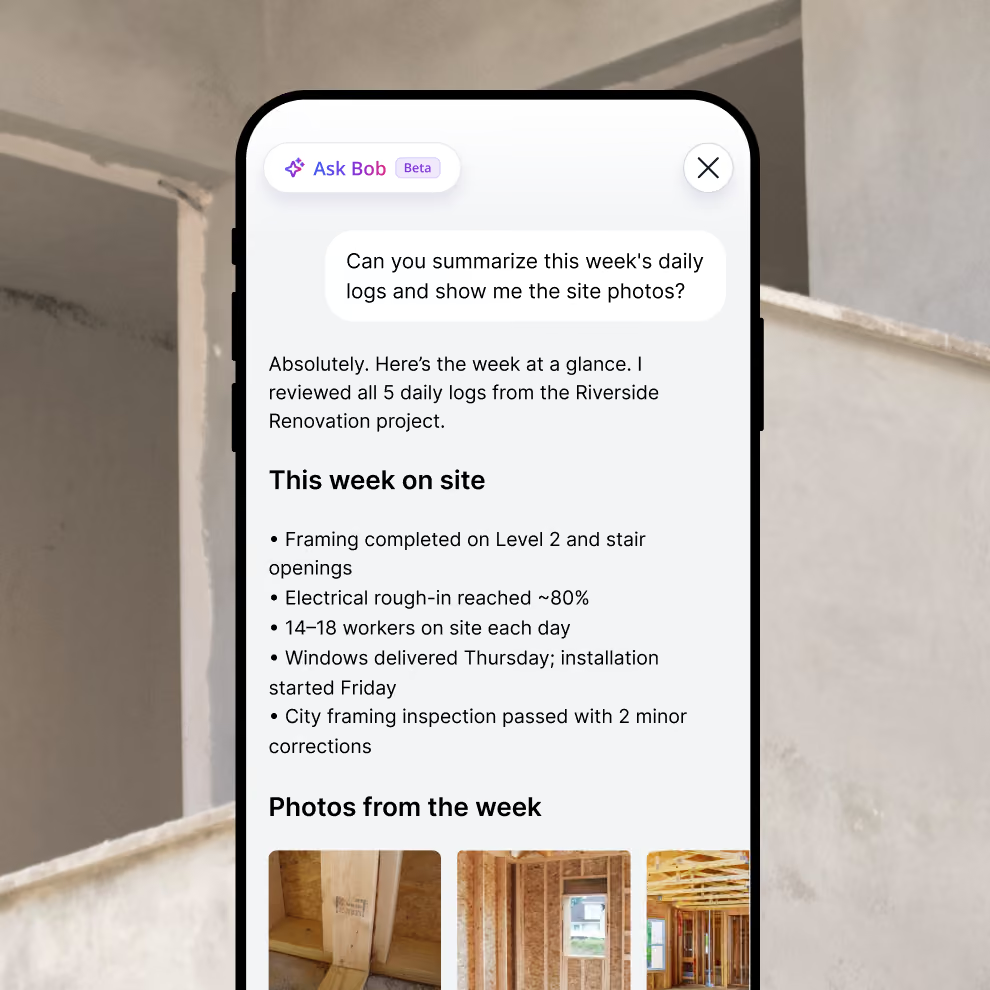
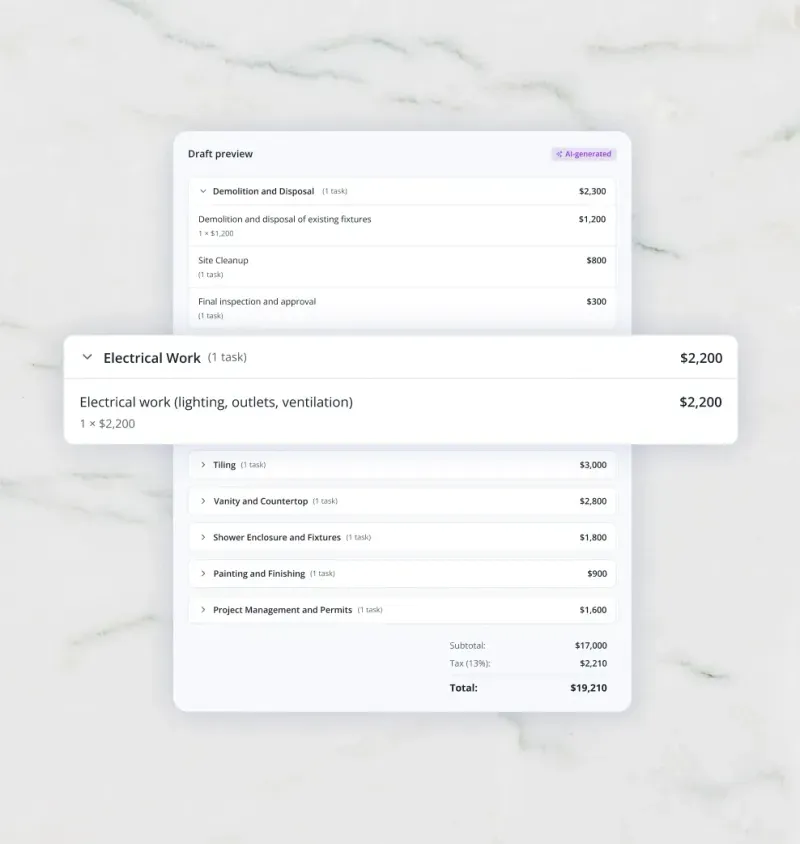
Billdr’s AI at work: Bob in the mobile app and a draft estimate from Bruno.
“We’re more productive on the back end than we ever have been thanks to Billdr and, you know, the AI tools specifically.” Dave Conroy, owner, The Little Building Company (Peterborough, Ontario). His team went from four people in the office to three doing the same work. Read the case study.
See AI-native construction management
Watch Bob and Bruno work on a real project.
👉 Explore Billdr’s AI features4 Mistakes to Avoid When Buying Construction AI
Buying a separate AI tool for every task, then re-entering data between them.
Judging AI on a canned demo instead of your own plans and jobs.
Paying for roadmap features that aren’t live yet.
Skipping the review step: AI drafts, people decide.
Spending too much time on admin?
See how general contractors use AI inside Billdr to estimate faster and keep every job on track.
👉 Schedule a 1-on-1 Billdr demoQ1: Which construction management software is AI-native?
AI-native platforms are built around AI from the start instead of adding it to an older product. Billdr is AI-native construction management software for general contractors and home builders: its AI copilot, Bob, and its AI estimator, Bruno, work inside the same system as estimates, change orders, budgets, schedules and invoices.
Q2: What does AI-native mean in construction software?
It means AI is part of the core product, not an add-on. The AI can see the whole job (estimates, schedules, costs, files and client messages) and act inside your normal workflows, like drafting an estimate or flagging an unapproved change order.
Q3: Is there an AI assistant for construction project management?
Yes. AI assistants for construction project management watch active jobs, flag risks, summarize daily logs and answer questions about project files. In Billdr, that assistant is Bob, an AI copilot that monitors every active project and flags issues like unapproved change orders and overdue invoices.
Q4: What can AI do for general contractors?
Today, AI for contractors helps draft estimates from plans, catch issues on active jobs, find answers in project documents, summarize daily logs and cut office admin. It works best on repetitive reading and drafting, with people making the final calls.
Q5: What are the best construction AI tools?
It depends on the job: AI estimators for pricing work, AI takeoff for measuring drawings, project copilots for keeping jobs on track, document review for contracts and specs, and site capture for progress tracking. General contractors who want these in one place look for AI-native construction management software.
Q6: Is AI construction software worth it for small contractors?
Often, yes, because small teams feel admin hours the most. One Billdr customer, The Little Building Company, went from four people in the office to three doing the same work. Start with the task that costs you the most time, usually estimating or job tracking.
Q7: Will AI replace construction project managers?
No. AI takes over reading, monitoring and first drafts, but project managers still run the site, manage people and subcontractors, handle clients and make the judgment calls.
Q8: How can I tell if a vendor’s AI is real?
Ask to see it work live on your own plans and data, ask which features are available today versus on the roadmap, and check whether the AI acts inside the product or is just a chat window.