

Buildertrend Alternatives for Small Residential Builders in 2026
Buildertrend stopped publishing prices in 2025, and CoConstruct customers now face a forced migration. If you're a small residential builder looking for an alternative, this guide compares the main options by what each one does best, what to check before you commit, and how to get an accurate price.
We build Billdr, one of the platforms in this guide. Each competitor is described from its public information. Pricing and features change often, so confirm current details on each vendor's website before you decide.
Why builders are looking at Buildertrend alternatives in 2026
No published pricing. Buildertrend quotes based on your annual construction volume, so you can't compare costs before talking to sales.
The CoConstruct migration. CoConstruct accepts new projects only through March 31, 2027. Read our guide to the CoConstruct migration for the timeline and the questions to ask.
Changing needs. Many small builders want estimating, scheduling and client communication in one system, without paying for features they won't use.
| CoConstruct milestone | Date | What it means for you |
|---|---|---|
| New projects allowed | Through March 31, 2027 | Last date to start a new project in CoConstruct |
| Formal migration to Buildertrend | Must begin by June 30, 2027 | Buildertrend's migration requires the transition to have started by this date |
CoConstruct's key dates, from CoConstruct's own migration page. Confirm the latest dates with CoConstruct.
What to compare before you switch
| What to check | Why it matters |
|---|---|
| Pricing you can see | Published pricing lets you budget before a sales call. |
| Estimating from your plans | Look for estimates built from your own cost catalog, not generic averages. |
| Client portal | Clients should approve quotes and change orders without a phone call. |
| Change orders and invoicing | Approved changes should flow into the budget and invoices. |
| QuickBooks Online sync | Most small builders keep their books there, so the sync saves double entry. |
| Migration help | Ask how your data moves over, especially cost catalogs and templates. |
| Support and training | Find out whether support is included and how long setup takes. |
Seven things to check before choosing a Buildertrend alternative.
The main Buildertrend alternatives
Each option below suits a different kind of builder. Descriptions are based on public information; check current features and pricing on each website.
| Platform | Best known for | Check before you buy |
|---|---|---|
| Billdr | AI estimating (Bruno), an AI project copilot (Bob), client dashboard, French and English | Published plans from $200 a month billed annually; Billie, the AI receptionist, is in development |
| JobTread | Construction management and estimating for builders, remodelers and specialty contractors | Pricing has varied across sources; check jobtread.com/pricing. Announced a CoConstruct migration path in June 2026 |
| Buildxact | Residential estimating, takeoffs and job management | Pricing is published but varies by plan and source; confirm the current plan with the vendor |
| Contractor Foreman | Construction management for small to mid-sized contractors: project management, scheduling, estimating, job costing, time tracking and mobile access | Pricing varies by source, and some list per-user plans. Confirm whether plans are per user or per company |
| Houzz Pro | Remodeler and design software: CRM, estimates, scheduling, client portal, invoicing and QuickBooks integration, plus design tools such as mood boards and 3D floor plans | Reviewers describe pricing as unclear or high for small businesses. Check current plans and the trial on the vendor's site |
| BuildBook | Residential builder and remodeler software: project tracking, scheduling, client communication, estimates and proposals | Pricing is listed from $79 a month by some sources and available on request by others. Confirm with the vendor |
Each platform is described from public information. Verify features and pricing before you decide.
How Billdr compares
Billdr is construction management software for general contractors and home builders, built in Montreal. For Buildertrend switchers, the main differences are:
Published pricing. Starter, Premium and Titanium plans, billed annually in Canadian dollars for Canadian customers and in USD for US customers.
AI built in. Bruno drafts estimates from your plans and your own prices, and Bob monitors active jobs and flags issues like unapproved change orders.

Bruno drafts a first quote from a project description and attached plans. Plans are optional.
French and English. Your team and your clients can use Billdr in either language, including the client dashboard.
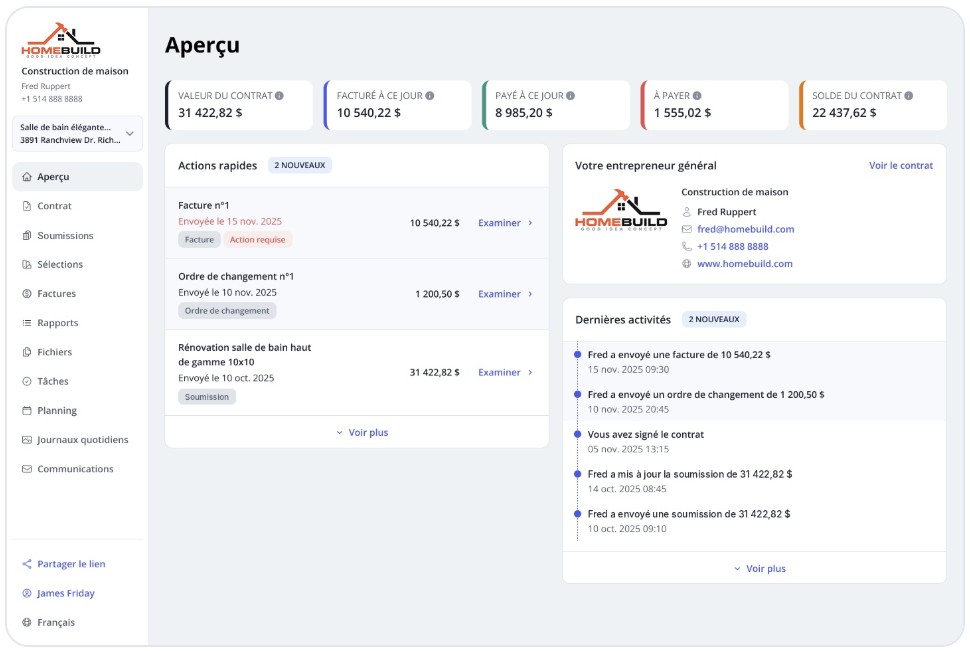
The Billdr client dashboard in French: quotes, invoices, change orders and project activity in one place.
Billdr is available in French and English. The screen above shows the French client view.
QuickBooks Online sync. Invoices, payments, expenses, bills, purchase orders and customers sync with QuickBooks Online. See our guide to QuickBooks for contractors.

In Billdr, you connect to QuickBooks Online from the settings and choose which records to sync, such as customers, invoices and payments.
| Plan | Monthly price (billed annually) | Currency |
|---|---|---|
| Starter | $200 per month | CAD for Canadian customers, USD for US customers |
| Premium | $550 per month | CAD for Canadian customers, USD for US customers |
| Titanium | $990 per month | CAD for Canadian customers, USD for US customers |
Billdr's published plans. See the pricing page for current details.
| Question | Billdr | What to check elsewhere |
|---|---|---|
| Is pricing published? | Yes, on the pricing page | Confirm on each vendor's site |
| AI estimating from plans | Bruno, included | Ask whether it prices from your own costs |
| AI project copilot | Bob, included | Ask what the assistant monitors |
| Client portal | Yes, in French and English | Ask about approvals and change orders |
| QuickBooks Online sync | Yes | Ask which records sync and in which direction |
Billdr compared with the questions to ask other vendors.
“It’s clean, it’s modern, it’s intuitive, it’s simple, but functional.” Dave Conroy, owner, The Little Building Company (Peterborough, Ontario). Read the case study.
Compare Billdr with your current software
See published pricing, Bruno's estimates and the client dashboard on a real project.
👉 Schedule a 1-on-1 Billdr demoHow to choose the right alternative
Start with the job that costs you the most time: estimating, scheduling, or client updates.
Ask each vendor for a written price for your team size, and compare the first-year total.
Test the estimate and change-order process with one real project before you sign.
Confirm what moves over from your current software, including cost catalogs and templates.
Q1: What are the best alternatives to Buildertrend?
The main options are JobTread, Buildxact, Contractor Foreman, Houzz Pro, BuildBook and Billdr. The best fit depends on your work: estimating from plans, managing active jobs, or running client communication and accounting in one place.
Q2: Is there a cheaper alternative to Buildertrend?
Buildertrend doesn't publish its prices, so no direct comparison is possible without a quote. Several alternatives publish pricing, which makes budgeting easier. For a very small, steady volume of work, a volume-based quote can sometimes come in lower, so get a written quote before deciding.
Q3: What happened to CoConstruct?
CoConstruct, acquired by Buildertrend in 2021, is no longer sold to new customers. Existing customers can add projects through March 31, 2027, and formal migrations to Buildertrend must begin by June 30, 2027. JobTread announced a migration path for CoConstruct customers in June 2026.
Q4: How is JobTread different from Buildertrend?
JobTread is a construction management and estimating platform for builders, remodelers and specialty contractors. Compare JobTread and Buildertrend on the features you use every day, and check each vendor's current pricing on its website, since pricing has changed.
Q5: Which Buildertrend alternative is best for estimating?
If estimating from plans is the main job, look at estimating-first tools such as Buildxact. If estimating needs to flow into the quote, change orders and invoices, compare platforms that include all of those in one system.
Q6: Does Billdr work as a Buildertrend alternative?
Yes. Billdr is construction management software for general contractors and home builders, with a client portal, estimating, scheduling, invoicing and QuickBooks Online sync. Plans start at $200 a month, billed annually in Canadian dollars for Canadian customers. Bob and Bruno, the AI copilot and AI estimator, are included.