
Daily Logs and Site Photos: A Practical Guide for Contractors
A construction daily log is a short written record of what happened on the jobsite each day: work completed, weather, who was on site, problems and photos. Keeping one, with dated photos attached, protects you in a dispute and keeps clients informed without extra calls.
We build Billdr, construction management software made in Montreal. The criteria in this guide apply to any software.
Why Daily Logs Matter
Disputes. A dated record shows what was done and when, which helps with change orders, delay claims and payment questions.
Client trust. Clients see progress without calling the site.
Your memory. Details are easy to forget after a long week.
Crew accountability. A record of who was on site and what they completed.
What Goes in a Construction Daily Log
| Item | Why it matters |
|---|---|
| Work completed that day | The basis of any progress record |
| Weather conditions | Explains delays and site conditions that affect the schedule |
| Crew and subcontractors on site | Proof of attendance if a labour claim comes up |
| Deliveries or materials received | Shows what arrived and when |
| Delays, problems or decisions | Prevents arguments over what was agreed |
| Safety notes | Records incidents and corrective actions |
| Photos or video of the work | The easiest evidence to understand |
Seven things worth recording in every construction daily log.
How to Take Useful Jobsite Progress Photos
Same spots, every visit. Photograph each area from the same angle so progress is easy to compare.
Before and after. Capture the condition before work starts and after it finishes.
Close-ups of anything hidden later. Framing, wiring, plumbing, insulation and footings.
A short caption. What the photo shows and where, such as "Second floor, north wall, framing complete."
Four Ways Contractors Keep Daily Logs
| Method | Good for | Where it breaks |
|---|---|---|
| Paper notebook | Quick notes on site | Lost pages, hard to search, no photos |
| Texts and a phone photo folder | Fast capture | Scattered across phones, no timeline |
| Spreadsheet | Structured records | Photos don't fit well, slow to fill in from the field |
| Construction management software | One timeline with photos and client sharing | Needs setup and a habit of daily use |
Four common ways to keep daily logs, and where each one breaks.
What to Look for in Construction Daily Log Software
Use these criteria when comparing daily log software or a daily log app, whichever tool you choose:
| What to look for | Why it matters |
|---|---|
| Photos and video from your phone | Progress photos are your best evidence, so capture should take seconds on site. |
| Easy entry for crews and subcontractors | Logs only work if the people on site actually complete them. |
| One timeline per project | You can find any day's record without digging through texts or folders. |
| Control over what clients see | You decide which logs a client can view. |
| Templates with consistent questions | Every crew answers the same things each day. |
| Connected to the rest of the job | Logs sit alongside quotes, change orders, schedules and invoices instead of in a separate tool. |
Six questions to ask about any daily log software.
Billdr's daily logs cover each of these, and the steps below show how they work.
How to Create a Daily Log in Billdr
Step 1: Open Daily logs. In the left-hand menu, select Daily logs to see every log across your projects.
Step 2: Create the log. Click Create a daily log. Choose the project, set the date, then answer the predefined questions or add your own notes.
Step 3: Add photos or video. Use the camera or upload from the photo library. Each file is saved to the log's media gallery.
Step 4: Add notes. Record work completed, problems and anything important that happened on site.
Step 5: Review and share. Admins get a notification when a log is uploaded. Logs are private by default, so turn on the Shared with client switch to make the log visible in the client dashboard.
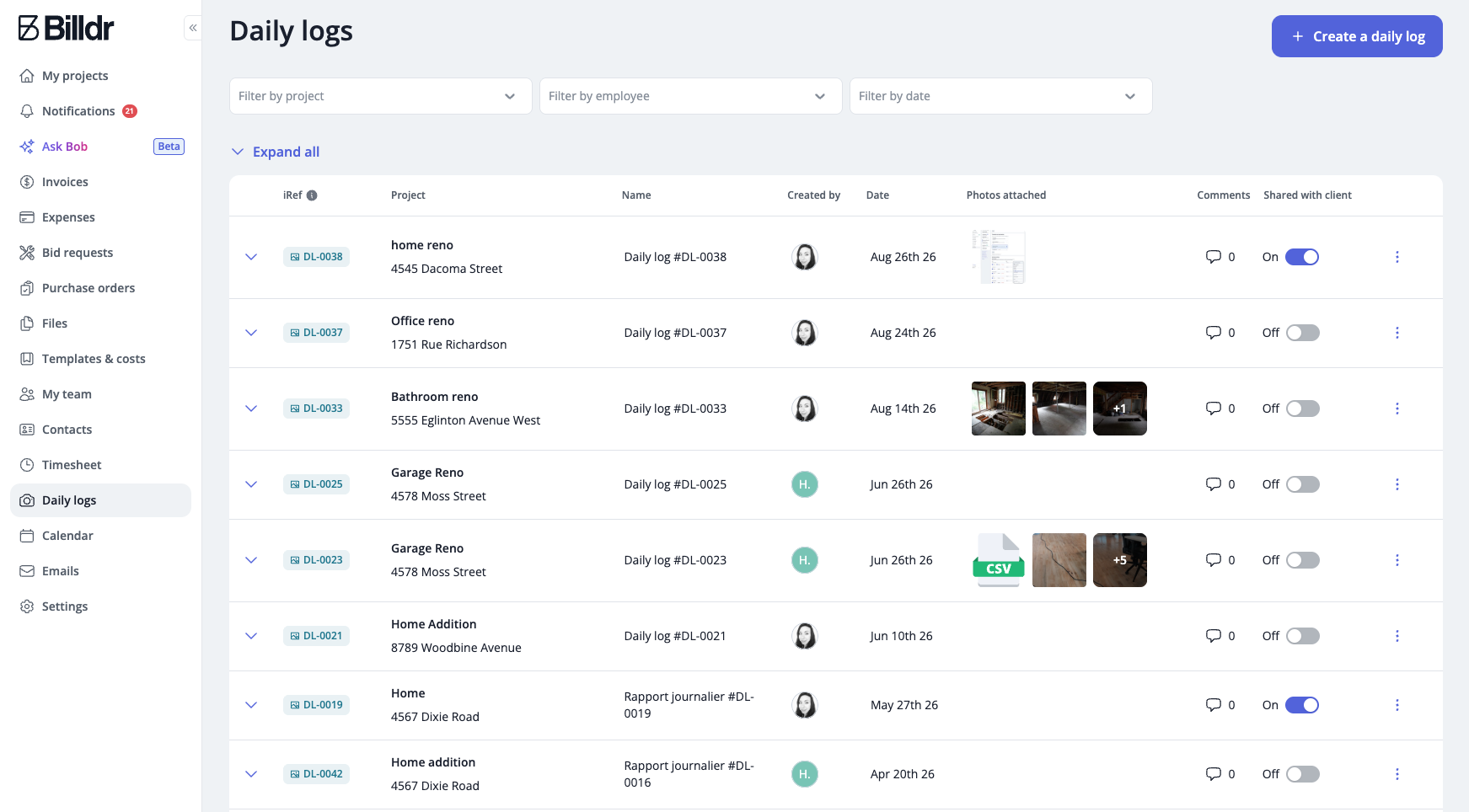
The Daily logs page: create a log with the button at top right, and turn on Shared with client to show it to the client.
Crews in the field. Employees and subcontractors complete logs from the Billdr mobile app or the employee and subcontractor portal, while they're still on site.
Templates. Set custom questions once and reuse them, so every crew answers the same things each day. See the Daily Logs feature page for more.
Sharing Daily Logs With Clients
Logs aren't shared by default. Once you turn on Shared with client for a log, it appears in the client's dashboard, where they can see the notes and photos for that day. You can switch it off again at any time.
Keeping Daily Logs Consistent
Set a fixed time each day to complete logs, such as the end of the shift.
Make photos part of the log, not a separate task.
Use the same questions for every project so logs are comparable.
Le Projet Local uses our daily logs to document their jobs with photos. Read their story.
Ready to use daily logs in Billdr?
Book a demo to see how daily logs fit your projects.
👉 Schedule a 1-on-1 Billdr demoQ1: What is a daily log in construction?
A construction daily log is a short written record of what happened on the jobsite on a given day: work completed, who was on site, weather, deliveries, problems and photos. It becomes part of the project record.
Q2: What should a construction daily log include?
Work completed, weather conditions, crew and subcontractors on site, deliveries or materials received, delays, problems or decisions, safety notes, and photos or video of the work.
Q3: Who fills out a daily log?
Usually the foreman, superintendent or project manager. In Billdr, employees and subcontractors can complete logs from the mobile app or the portal on site, and admins can create or complete them from the office.
Q4: Do I need to fill in a daily log every day?
Not every day has to be recorded, but consistent logs are much more useful in a dispute than occasional ones.
Q5: How long should you keep daily logs?
Keep them at least until your contract, warranty and claim periods end. The exact period depends on your contract and local rules, so confirm it with your lawyer or insurer.
Q6: What is the difference between a daily log and a daily report?
In practice the terms are used interchangeably: both describe a record of the day's work, crew, weather, issues and photos. Some companies use daily report for the version sent to a client or the office.
Q7: What should I look for in daily log software?
Photo and video capture from a phone, easy entry for crews and subcontractors, one timeline per project, control over what clients see, templates with consistent questions, and a connection to the rest of the job. See the checklist above.
Q8: Can my crew add daily logs from their phones?
Yes. Employees and subcontractors can complete logs from the Billdr mobile app or the portal on site.
Q9: Can clients see daily logs?
Only when you turn on Shared with client for that log.
Q10: Can I attach photos and video to a daily log?
Yes, from the camera or your photo library.
Q11: Can I customize the questions in a daily log?
Yes, with a daily log template.
Q12: Which Billdr plans include daily logs?
Daily logs are included on Premium, Titanium and Enterprise plans.